


Widgets OS 18 – Color Widgets
how to customize your Android home screen
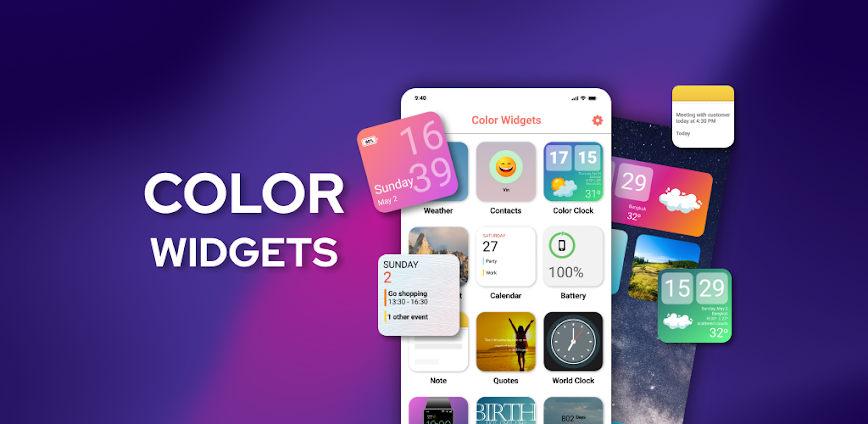
Add style to your Android with good-looking, customizable widgets. Whether you prefer your homescreen minimal and tidy or loaded with colorful detail, this app can help you build a perfect home screen.
Easily customize your home screen.
Build various functional and fashionable widgets with only a few taps: With Widgets OS 18 – Color Widgets. Options include:
- Color adjusting, font, and widget layout adjustment
- Upload photos or albums personally
- Choosing between modern, OS-inspired designs
- Shows the time, weather, reminders, and more
Every element is fully customizable, putting you in control of your home screen style.
- Included Widget Types
- Step & Calories Counter
- Battery Status Display
- Calender
- Digital Watch
- Photo/Album Widget
- Motivational Quotes
- Notes & Reminders
- Weather forecast
- World Clock
- Color Clock
- An-more in the pipeline
Premium Features
- Advanced users will find the following functions available through the app:
- Advanced editing tools
- Live weather widgets
- X GetMessage – Fancy Colour Clock with live information
- Keep Widgets Updated
- Turn on background activity in your settings for the best experience. This helps widgets keep refreshing in real time and showing you accurate information.
Why choose this widget customization application?
It’s free, easy, and built for anyone who wants an Android home screen that’s a bit different and organized. From functional widgets to flashy layouts, this application will help you build a setup that reflects your personality. Download it now and give a makeover to your home screen! Disclaimer: All product names, trademarks, and logos are the property of their respective owners. The application is an independent development and has no relation to any other company or application.
Widgets OS 18 – Color Widgets

All Version


info:



info:

info:

info:

info:
info: