



KineMaster – The Ultimate AI-Powered Video Editor for Movies, Reels, and Shorts 🎥
Transform your video ideas into professional-quality creations with KineMaster. Whether you’re making movies, vlogs, Reels, or Shorts, KineMaster gives you the tools to edit videos quickly and easily, using AI-powered features that bring your vision to life.
🤖 Powerful AI Tools for Effortless Video Editing
KineMaster’s advanced AI features help you create stunning videos without needing professional experience:
AI Auto Captions: Automatically generate accurate subtitles for videos or audio.
AI Text-to-Speech: Turn your text into natural, realistic audio.
AI Voice Effects: Customize audio with lifelike AI voices.
AI Music Match: Get song recommendations tailored to your video mood.
AI Background Removal: Easily remove backgrounds from people or objects.
AI Noise Reduction: Eliminate unwanted background noise with one click.
AI Vocal Separation: Isolate vocals or instrumentals for creative remixes.
AI Tracking: Make text, stickers, or effects follow moving objects.
AI Upscaling: Improve low-resolution videos to HD or 4K quality.
AI Style Effects: Apply artistic filters and effects to videos and photos.
🎬 Professional Video Editing Made Simple
KineMaster brings advanced editing tools to everyone, from beginners to experienced creators:
Keyframe Animation: Control the movement, size, and rotation of elements.
Chroma Key (Green Screen): Replace backgrounds and combine clips like a pro.
Speed Control: Reverse, slow down, or create cinematic time-lapse effects.
✨ Boost Creativity with Templates and Tools
Save time and get inspired with KineMaster’s pre-made templates and creative features:
Thousands of Templates: Start projects quickly with customizable video templates.
Mix & Share: Save your projects and share templates with the KineMaster community.
KineCloud: Back up your projects and edit anytime, anywhere.
🎨 Level Up Videos with Premium Assets
Explore the KineMaster Asset Store with thousands of free and premium resources:
Effects & Transitions: Add cinematic visuals and smooth transitions.
Stickers & Motion Graphics: Make videos more engaging and fun.
Royalty-Free Music & SFX: Enhance your videos with high-quality audio.
Stock Videos & Images: Use backgrounds and stock footage for creative storytelling.
Stylish Fonts & Color Filters: Add professional typography and cinematic color tones.
📹 Export in High Quality
Choose the output that fits your goals:
4K 60 FPS: Ultra-high-definition export for stunning clarity.
Social Media Formats: Optimized for YouTube, TikTok, Instagram, and more.
Transparent Backgrounds: Export videos ready for overlays and compositing.
⚙️ Intuitive Editing Tools
KineMaster makes editing smooth and precise:
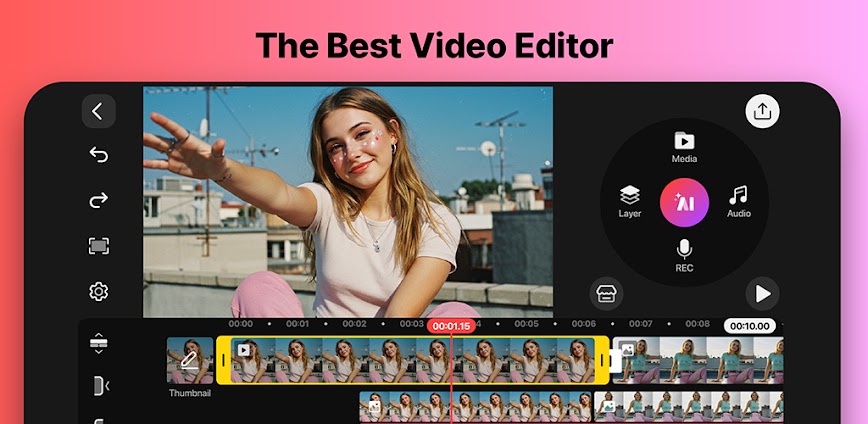
Multiple Layers: Combine videos, images, and GIFs seamlessly.
Undo & Redo: Quickly correct mistakes without losing progress.
Magnetic Guides: Align elements perfectly on the timeline.
Full-Screen Preview: Review your edits before finalizing.
📧 Support and Policies
For usage details, terms, and policies, visit:
KineMaster Terms of Service


All Version


info:



info:

info:

info:

info: